2D Shaders in Godot
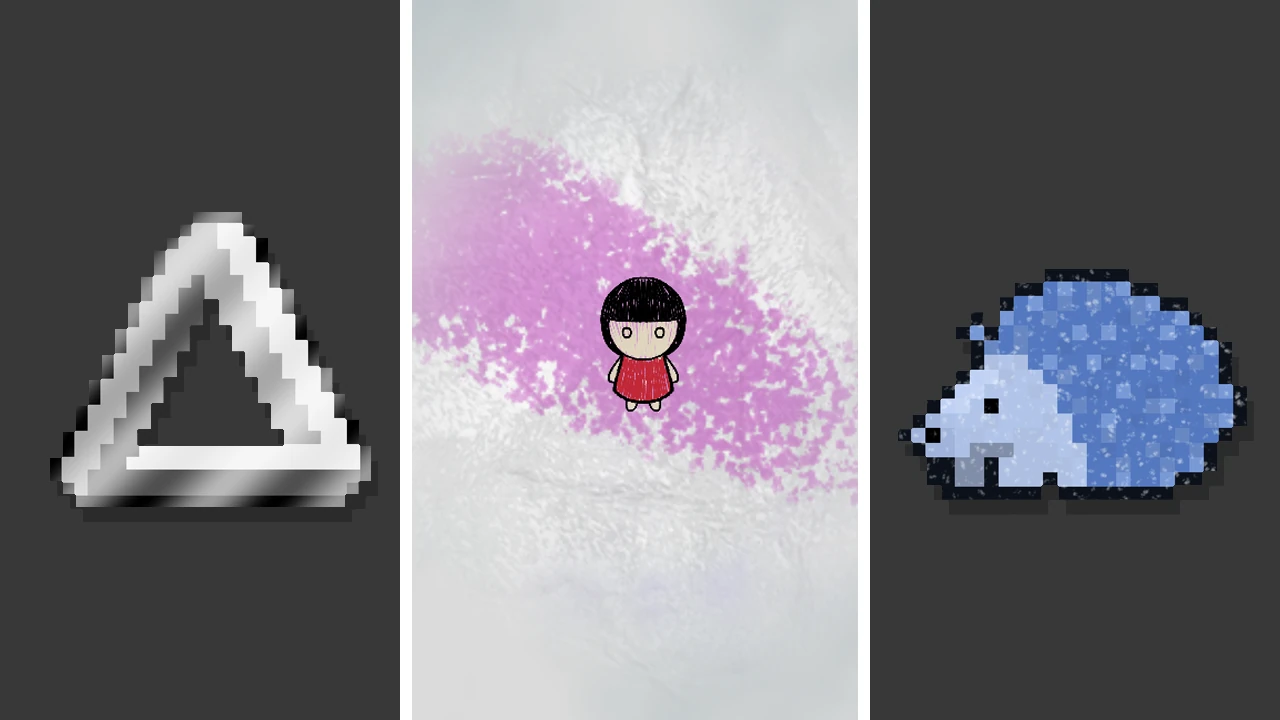
Three 2D shaders written for game jam projects. The metallic and glitter shaders mark upgraded spaces on a roguelike's "wheel of fortune" board, inspired by Balatro's card modifiers. The fog shader limits the player's view distance, with customizable colors and fog that clears around a given position.
These shaders came from game jam projects that were never finished; this page is about the shader work itself. Each demo below is a WebGL port of the Godot shader running live, so you can change its uniforms and watch the result. The demos start with the same values as the original materials, and the noise textures are generated with FastNoiseLite (the noise library built into Godot) using the original settings.
Metallic
Very Serious Juniper Dev Game Jam · 2026
Live demo needs WebGL, which isn't available in this browser.
A band of light sweeps diagonally across the sprite. The roguelike used it to mark which spaces on its “wheel of fortune” had been upgraded, similar to Balatro’s card modifiers.
How it works: For each pixel, the shader takes a weighted sum of the pixel’s screen position plus time and passes it through sin(), creating a wave that travels across the screen. The wave is remapped from −1…1 to 0…1, scaled by max_weight, and used to blend the sprite’s color toward target_color. Multiplying by the original alpha at the end keeps transparent pixels transparent, so the sheen follows the sprite’s shape. x_coefficient and y_coefficient set the band’s angle and width, and speed sets how fast it moves. Because the wave uses screen coordinates (FRAGCOORD) rather than UVs, sprites next to each other share one continuous sweep.
Show shader code
shader_type canvas_item;

uniform vec4 target_color : source_color = vec4(1.0, 1.0, 1.0, 1.0);
uniform float speed = 1.0;
uniform float x_coefficient = 0.008;
uniform float y_coefficient = 0.008;
uniform float max_weight = 0.6;

void fragment() {
	vec4 base_color = texture(TEXTURE, UV);
	float wave = (sin(x_coefficient * FRAGCOORD.x + y_coefficient * FRAGCOORD.y + speed * TIME) + 1.0) / 2.0;
	float weight = wave * max_weight;

	vec4 final_color = mix(base_color, target_color, weight);
	COLOR = final_color * vec4(1.0, 1.0, 1.0, base_color.a);
}
Glitter
Very Serious Juniper Dev Game Jam · 2026
Live demo needs WebGL, which isn't available in this browser.
Scattered specks catch the light as it passes over them. This was a second upgrade marker for the same wheel.
How it works: It uses the same traveling wave as the metallic shader, but before blending, the wave is multiplied by the alpha of a noise texture sampled in the sprite’s UV space. Only the pixels where the noise is opaque can light up, so instead of a smooth band you get individual specks that brighten as the wave passes. The noise is ridged simplex noise run through a color ramp that is opaque at the low end and fully transparent above about one third, so only scattered points survive. The specks stay fixed to the sprite while the light moves in screen space, and those two coordinate spaces together make it read as glitter.
Show shader code
shader_type canvas_item;

uniform float speed = 1.0;
uniform float x_coefficient = 0.008;
uniform float y_coefficient = 0.008;
uniform float max_weight = 0.6;
uniform vec4 target_color : source_color = vec4(1.0, 1.0, 1.0, 1.0);
uniform sampler2D noise_texture : repeat_enable;

void fragment() {
	vec4 base_color = texture(TEXTURE, UV);
	float wave = (sin(x_coefficient * FRAGCOORD.x + y_coefficient * FRAGCOORD.y + speed * TIME) + 1.0) / 2.0;
	float weight = wave * texture(noise_texture, UV).a * max_weight;

	vec4 final_color = mix(base_color, target_color, weight);
	COLOR = final_color * vec4(1.0, 1.0, 1.0, base_color.a);
}
2D Fog
GMTK Game Jam · 2026
Live demo needs WebGL, which isn't available in this browser.
Move your pointer over the scene
Drifting fog that covers everything except a clearing around the player, which limits how far the player can see.
How it works: Two seamless noise textures (the same simplex settings with different seeds) scroll across the fog’s UVs over time. Their red channels are averaged into a density value, which picks a color between color and secondary_color so thicker patches look different from thin ones. The fog’s opacity is color.a, times the combined noise, times a smoothstep on the distance from player_position. Within 20% of fog_radius the fog is fully clear, and it fades back to full strength at fog_radius. The game passes the player’s position in as player_position, so the clearing follows the player.
Changes in this demo: The fog is thinner than in the game (color.a starts at 0.4 instead of 1.0), where it was thick on purpose to limit what the player could see. As an experiment, the second noise layer also gets its own scroll_speed_2, set about 1.5× faster than the first by default. The two layers drift past each other, so the fog changes shape as it moves instead of sliding by as one sheet. The code below is the original shader, where both layers share scroll_speed.
Show shader code
shader_type canvas_item;

uniform vec4 color : source_color = vec4(1.0, 1.0, 1.0, 1.0);
uniform vec4 secondary_color : source_color = vec4(1.0, 1.0, 1.0, 1.0);
uniform sampler2D noise_texture : repeat_enable;
uniform sampler2D noise_texture_2 : repeat_enable;
uniform vec2 scroll_speed = vec2(1.0, 0.1);
uniform vec2 player_position = vec2(0.0, 0.0);
uniform float fog_radius = 0.0;

void fragment() {
	float noise_1 = texture(noise_texture, UV + TIME * scroll_speed).r;
	float noise_2 = texture(noise_texture_2, UV + TIME * scroll_speed).r;
	float density = (noise_1 + noise_2) / 2.0;
	float clearing = smoothstep(fog_radius * 0.2, fog_radius, distance(UV, player_position));

	COLOR.rgb = mix(color.rgb, secondary_color.rgb, density);
	COLOR.a = color.a * (noise_1 + noise_2) * clearing;
}